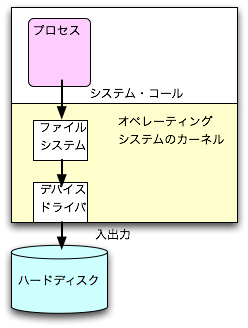
図? ディスクとファイル
情報システム概論 I

                                       筑波大学 システム情報工学研究科
                                       コンピュータサイエンス専攻, 電子・情報工学系
                                       新城 靖
                                       <yas@is.tsukuba.ac.jp>
このページは、次の URL にあります。
http://www.coins.tsukuba.ac.jp/~yas/coins/compsys1-2007/2008-02-14
あるいは、次のページから手繰っていくこともできます。
http://www.coins.tsukuba.ac.jp/~yas/
http://www.cs.tsukuba.ac.jp/~yas/
Unix Super Text 上巻「第9章 ファイルとディレクトリ」、「第21章 ファイル とディレクトリの高度な操作」、「第23章 アクセス制御」、下巻「第45章 記 憶媒体」参考。
永続的なメモリを仮想化して使いやすくしたものが、
ファイルやデータベース。
図? ディスクとファイル
もしも、ファイルに名前がつけられなかったら・・・・。
FOPEN(3)                 BSD Library Functions Manual                 FOPEN(3)

NAME
     fopen, fdopen, freopen -- stream open functions

LIBRARY
     Standard C Library (libc, -lc)

SYNOPSIS
     #include <stdio.h>

     FILE *
     fopen(const char * restrict path, const char * restrict mode);

     FILE *
     fdopen(int fildes, const char *mode);

     FILE *
     freopen(const char *path, const char *mode, FILE *stream);

DESCRIPTION
     The fopen() function opens the file whose name is the string pointed to
     by path and associates a stream with it.
なぜ、先頭から順にアクセスするのか。
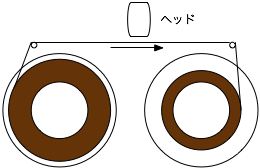
図? 磁気テープ
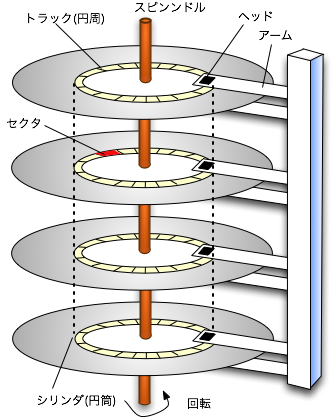
図? ハードディスクの構造
ハードディスク上に作られたファイルは、(テープ上に作られたファイルと違っ て)、先頭から順にアクセスだけでなく、メインメモリと同様に、任意の順番 に配列のようにアクセスすることができる。
API
int x;

f()
{
    int y ;
    static int z ;
}
| 種類 | スコープ | 寿命 |
|---|---|---|
| 外部変数 | 全プログラム | プログラムの実行開始から終了まで |
| 普通の局所変数 | 関数内 | その関数の実行中とそこから別の関数を呼んでいる間 |
| staticな局所変数 | 関数内 | プログラムの実行開始から終了まで |
| static変数(関数の外に定義) | 同一ファイル内 | プログラムの実行開始から終了まで |
| (C言語にはない) | (いろいろ) | プログラムの終了後も残る |
   1:	/*
   2:	        counter-mem.c -- print the counter value in memory.
   3:	*/
   4:	#include <stdio.h>
   5:
   6:	int counter = 0;
   7:
   8:	main( int argc, char *argv[], char *envp[] )
   9:	{
  10:	        printf("%d -> ",counter );
  11:	        counter = counter + 1 ;
  12:	        printf("%d\n",counter );
  13:	}
実行例:
% make counter-mem ![[←]](../icons/screen-return.gif) cc counter-mem.c -o counter-mem
% ./counter-mem
0 -> 1
% ./counter-mem
0 -> 1
% ./counter-mem
0 -> 1
%
cc counter-mem.c -o counter-mem
% ./counter-mem
0 -> 1
% ./counter-mem
0 -> 1
% ./counter-mem
0 -> 1
% ![[]](../icons/screen-cursor.gif)
何度実行しても、0 から始まる。
   1:	/*
   2:	        counter-file.c -- print the counter value in a file.
   3:	*/
   4:	#include <stdio.h>
   5:
   6:	static void load_counter();
   7:	static void save_counter();
   8:
   9:	int counter = 0;
  10:
  11:	main( int argc, char *argv[], char *envp[] )
  12:	{
  13:	        load_counter();
  14:	        printf("%d -> ",counter );
  15:	        counter = counter + 1 ;
  16:	        printf("%d\n",counter );
  17:	        save_counter();
  18:	}
  19:
  20:	#include <unistd.h>     /* pread() */
  21:	#include <fcntl.h>      /* open() */
  22:	#include <stdlib.h>     /* exit() */
  23:
  24:	#define FILENAME "counter.data"
  25:
  26:	static void
  27:	load_counter()
  28:	{
  29:	    int fd ;
  30:	        fd = open(FILENAME,O_RDWR|O_CREAT,0666);
  31:	        if( fd < 0 )
  32:	        {
  33:	            perror(FILENAME);
  34:	            exit(1);
  35:	        }
  36:	        read( fd, &counter, sizeof(counter) );
  37:	        close( fd );
  38:	}
  39:
  40:	static void
  41:	save_counter()
  42:	{
  43:	    int fd ;
  44:	        fd = open(FILENAME,O_RDWR|O_CREAT,0666);
  45:	        if( fd < 0 )
  46:	        {
  47:	            perror(FILENAME);
  48:	            exit(1);
  49:	        }
  50:	        write( fd, &counter, sizeof(counter) );
  51:	        close( fd );
  52:	}
% make counter-file
cc     counter-file.c   -o counter-file
% ls -l counter.data
ls: counter.data: No such file or directory
% ./counter-file
0 -> 1
% ls -l counter.data
-rw-r--r--   1 yas  prof  4 Feb 13 18:40 counter.data
% ./counter-file
1 -> 2
% ./counter-file
2 -> 3
% ./counter-file
3 -> 4
%
実行する度に、カウンタの値が増える。最初に実行した時に、ファイル
"counter.data"が作られる。大きさは、4 バイト。int 型の大きさと同
じ。
| もの | 指すもの | 内容 |
|---|---|---|
| メインメモリ | 番地(数) | バイト単位 |
| 配列 | 添字(index)(数) | 任意のデータ単位 |
例:Rubyの連想配列。「{}」で空の連想配列が作られる。その後は、普通の配 列と同様に代入できる。
#!/usr/bin/ruby

aa = {};
aa["apple"] = 100;
aa["orange"] = 120;
printf("apple == %d\n", aa["apple"] );
printf("orange == %d\n", aa["orange"] );
実行例:
% ./ruby-assoc.rb
apple == 100
orange == 120
%
連想配列のことを、プログラミング言語によっては、ハッシュ表(Hash table)
ということもある。
C言語にはないが、プログラムの実行開始前にも有効で、終了後にも有効な変 数を考えてみる。これを永続的な変数という。
プログラミング言語で永続的な変数を支援しているものがある。
一般の言語からは、ライブラリ関数で「永続的なハッシュ表(連想配列)」と して扱うことが多い。
保存するプログラム [ruby-dbm-store.rb]
#!/usr/bin/ruby

require 'dbm';
db = DBM::open("fruits",0666);
db["apple"] = 100;
db["orange"] = 120;
db.close();
保存されたデータを利用するプログラム
[ruby-dbm-print.rb]
#!/usr/bin/ruby

require 'dbm';
db = DBM::open("fruits");
printf("%d\n", db["apple"] );
db.close();
実行例:
% ls fruits.db
ls: fruits.db: No such file or directory
% ./ruby-dbm-store.rb
% ls fruits.db
fruits.db
% file fruits.db
fruits.db: Berkeley DB (Hash, version 7, native byte-order)
% ./ruby-dbm-print.rb
100
%
ファイルと同様に、 永続的な記憶媒体を 仮想化して使いやすくしたもの。
ファイルと違い
「関係」とは、2次元の表。 関係データモデルでは、表の集合としてデータベースを構築する。
| サークル名 | 部屋番号 | 電話番号 |
|---|---|---|
| テニス | 101 | 1011 |
| サッカー | 203 | 4423 |
| 社員番号 | 氏名 | 基本給与 | 住所 |
|---|---|---|---|
| 001 | 筑波太郎 | 400 | つくば市××× |
| 002 | 土浦次郎 | 450 | 土浦市△△△ |
| 003 | 水戸三郎 | 450 | 水戸市○○○ |
| サークル名 | 社員番号 | 役職 |
|---|---|---|
| テニス | 001 | 代表 |
| テニス | 002 | 会計 |
| サッカー | 001 | 一般部員 |
| サッカー | 003 | 幹事 |
% sqlite3 company1.db
SQLite version 3.1.3
Enter ".help" for instructions
sqlite> create table circles( name char(20), room char(3), phone char(4));
sqlite> insert into circles values('ukouken', '123', '4444');
sqlite> select * from circles where room='123';
ukouken|123|4444
sqlite> .quit
% ls -l company1.db
-rw-r--r--   1 yas  prof  2048 Feb 15 16:36 company1.db
%
挿入したデータは、消す(delete)まで使える。
% sqlite3 company1.db
SQLite version 3.1.3
Enter ".help" for instructions
sqlite> select * from circles where phone='4444';
ukouken|123|4444
sqlite> .quit
%
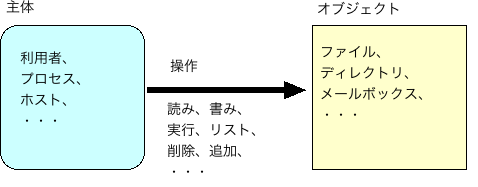
図? アクセス制御における主体、オブジェクト、および、操作
ファイルの「内容」のアクセス3段階であるが、ファイルの「属性」次の2段 階である。